

In the previous article we saw that forgetfulness is the main cause of absences from scheduled meetings. We know that in today's society we all live in an information-saturated environment, and even the most organized individual can overlook a commitment.
So, after understanding why your clients don't show up for meetings, the next challenge is: reduce no-shows without turning your agenda management into an additional burden.
Because if avoiding no-shows means sending more manual emails, making more calls or keeping an eye on every appointment, the remedy ends up being worse than the problem.
This is where process automation becomes your best ally, with automatic reminders being a silent but incredibly powerful strategy to ensure your schedule stays full and maximize your productivity.
But it's not just about sending a message. An effective reminder is an art that combines perfect timing, the right channel and a tone that reinforces the relationship with your customer. In fact, according to internal data obtained from consultations with our own users, many have managed to reduce absences by more than 80% after introducing automatic reminders into their workflows.
So it's not about working more, it's about working better, supported by well-designed automated processes.
The psychology of the reminder: beyond the simple reminder
When a customer does not attend a meeting, it is often not for lack of interest. It is, in most cases, simple absent-mindedness. An automated reminder not only combats this risk, but also achieves several key psychological objectives:
- Reinforces commitment: Each reminder is a little nudge that puts the appointment back on the client's radar, solidifying the initial commitment.
- Conveys professionalism: A well-managed, automated communication system demonstrates organization and care for the customer's time, which improves their perception of your business.
- It opens a communication channel: It makes it easier for the client to let you know if they need to cancel or reschedule, avoiding total absence.
When these three aspects fit together, no-shows are no longer dependent on the customer's will and become supported by a process.
Of course, not all reminders reduce absences. The difference is not in sending more messages, but in sending the right message, at the right time and with the right information.
Perfect timing: when to send reminders
One of the most common mistakes is to send reminders too late or too early. The key is balance: you want to be present and not pushy, finding the right time.
A pattern that works in most cases and we always recommend to our users when they ask us for advice is:
-
A first reminder well in advance (e.g. 24 or 48 hours before), allowing you to rearrange the agenda if necessary.
-
A second reminder close to the meeting(e.g. 1 or 2 hours before), acting as a final warning before the meeting.
This scheme avoids saturating the client and, at the same time, reduces the probability of forgetfulness.
With tools like TuCalendi you can fully automate this sequence, defining the messages and customizing the timing just once so that each meeting follows the same standard.
Content matters: the personalization that makes the difference
An automated process does not have to mean "robotic". A personalized message has a much greater impact. Here are some tips:
- Use the customer's name: Including the customer's name at the beginning of the message immediately makes it more personal.
- Tailor the tone to your brand: Are you formal and corporate, or approachable and friendly? Keep it consistent.
- Include a detail of value: Briefly remind them of the purpose of the meeting. For example, "...for our session on how to optimize your marketing strategy."
Also, an effective reminder should not just say "we'll see you tomorrow."
It should include the relevant meeting information:
-
Exact date and time
-
Time zone (especially for online meetings)
-
Link or location
-
Clear option to cancel or reschedule
When the customer knows exactly what to expect and how to act, uncertainty decreases and with it, no-shows.
Workflows: where strategy becomes a system
So far we've talked about what to send and when to send it. But for everything to work consistently, you need more than just good intentions: you need a well-defined workflow.
To show you how this translates into practice, here is a real example of a workflow set up in TuCalendi:
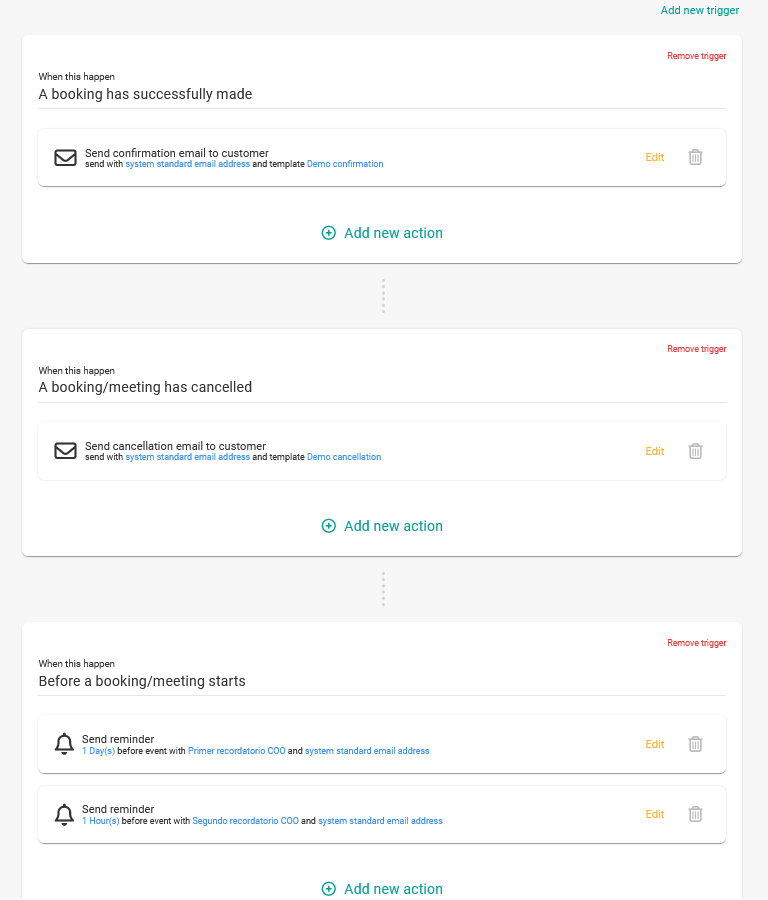
From that point on, the system takes care of:
-
Send immediate confirmation
-
Schedule reminders according to the defined calendar
-
Selecting the personalized message to be sent at any given time
-
Allow for frictionless cancellations or rescheduling
When these steps are integrated into a single process, manual forgetfulness and improvisations disappear, ensuring that each customer receives the right information at the right time and without depending on your intervention.

At TuCalendi we have designed a workflow system to be powerful and flexible. In just a few clicks you can create a workflow and assign each type of meeting to the corresponding workflow to automate the entire process. This way, every appointment follows the same professional standard without you having to intervene at every step.
The result is not only a reduction in no-shows, but a more stable agenda, fewer interruptions and a clearer customer experience.
Frequently asked questions about automated reminders and meeting absence reduction
Here are some of the most common questions about automated reminders and how they help reduce missed meetings.
How many reminders are recommended before a meeting?
In most cases, a first reminder well in advance and a second close to the meeting is sufficient to reduce no-shows without saturating the customer. The ideal frequency depends on the type of service and the profile of the clientele.
Can automatic reminders be annoying?
No, as long as they are well configured. When the message is clear, useful and arrives at the right time, the reminder is perceived as a help and not as an interruption. The key is balance and tone.
Is it better to send reminders by email or other channels?
Email is sufficient for most professional meetings. In certain industries it can be useful to combine it with other channels, but it is not the medium that is important, but the clarity of the message and the timing.
What is the difference between sending reminders manually and using workflows?
Manual reminders depend on the time and attention of each person, which increases the risk of errors and inconsistencies. An automated workflow ensures that each meeting follows the same process without the need for constant intervention.
Do workflows really reduce no-shows?
Yes. They eliminate human error, ensure consistency and guarantee that every appointment follows the same process with no exceptions.
Does setting up automatic reminders take a lot of time?
No. Once workflows are defined, the system works automatically and saves time right out of the box.
Does automating reminders depersonalize the customer relationship?
Not necessarily. In fact, when messages are well written and personalized, automation enhances the customer experience by providing clarity, consistency and professionalism.
Bottom line: fewer no-shows without more effort
Automated reminders are much more than a simple notification. They are a system that protects your time, professionalizes your service and strengthens your relationship with your customers. It's about designing a system that works for you.
When integrated into a well-designed workflow, they stop being a simple notification and become a silent strategy that reduces no-shows in a consistent and predictable way.
If you want to stop chasing confirmations and start working with a more reliable schedule, automation is the natural next step.
Want to see how they work in practice? Request a personalized demo of TuCalendi and discover how to automate your meetings, avoid missed meetings without adding more work to your day.