
TuCalendi lets you use tags in the customization of email notifications, so that the information sent to customers when they book any event is dynamic and the communication is automated.
For example, you no longer need to write each email with the booking information to a customer yourself. By customizing the notification templates and using tags, every email TuCalendi sends to your customer arrives fully customized with your data and without any possibility of error.
Entering tags is very simple. When you are in the email template editor and typing a text, you just have to type the character { and the list of tags will be displayed so you can select the one you need. Once you have chosen it, it will appear in the email template between { }.
You can also click on the "Tags" option to see the list of replacement tags:
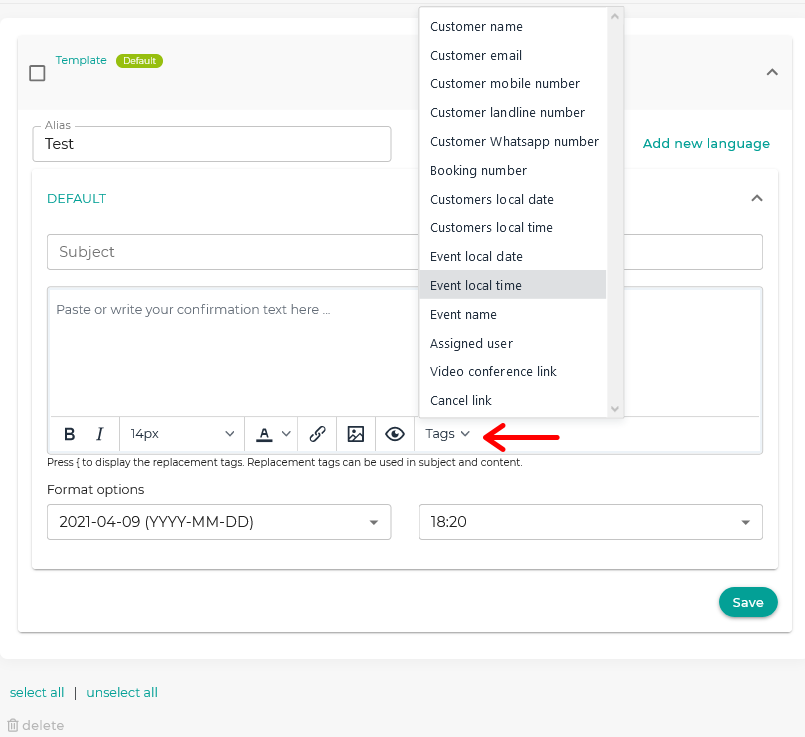
Replacement tags can also be included in the subject field of emails. In this case, you must always write the tag between curly braces, like {tag}.
Click here to see the replacement tags available in TuCalendi.