
To make configuring webhooks easier and to avoid having to make test bookings to check that they work, we have created the sandbox for TuCalendi webhooks.
This way you don't need to make test bookings. The sandbox simply sends all the information of a fictitious booking to the external platform you are using, so you can simulate the webhook.
Log in to TuCalendi with your username and password. Go to "Settings".
Click on "Sandbox":
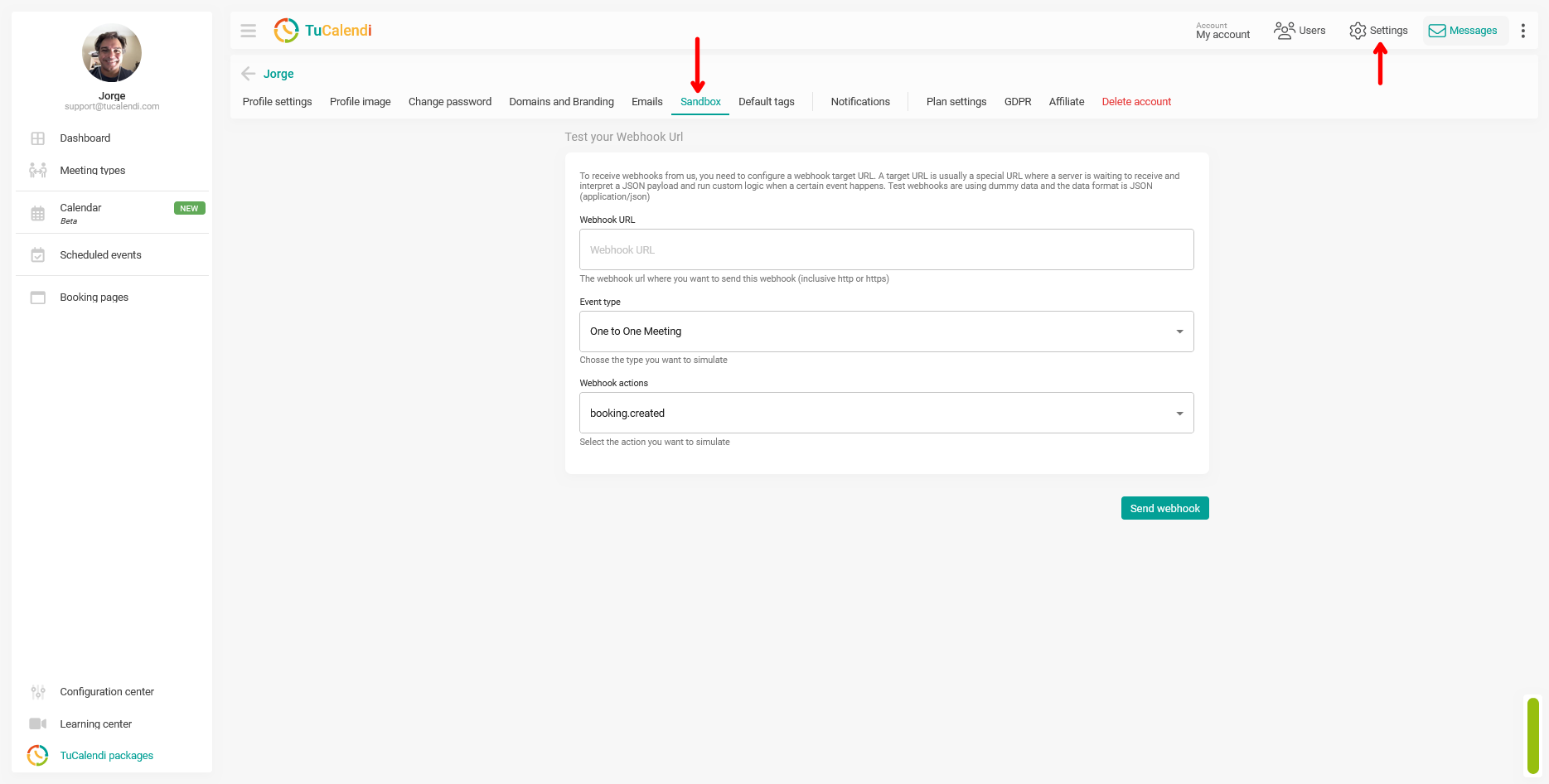
All you have to do is fill in the following fields:
- Enter the webhook URL that the webhook with all the information will be sent to.
- Choose the event type you want to simulate.
- Select the action you want to test.
Once you're done, click on "Send webhook" and all the simulated booking data will be sent to the platform you specified with the webhook URL.
This way you don't have to manually make a test booking from the widget every time you want to test a webhook.
Once you have tested the webhook with the simulation, you can add the webhooks to the workflows so that when you receive bookings from your customers, the information of each booking is sent to the external platform you want to connect with.