

One person asks for a demo in German. Another wants a demo in Spanish. A third is already a customer and needs help with their account. If all three requests land in the same calendar, someone has to sort them out, pass them on and, in some cases, rebook the appointment.
With TuCalendi, you can handle this in two steps: a smart routing form directs each request to the appropriate meeting type, and Round Robin distributes bookings among the sales reps who can host that meeting. You can share a single form and offer each person the right booking option based on their answers.
Here’s how it works with one form, two demo languages and three test requests.
1. Decide who should handle each request
Imagine your company offers demos in Spanish and German. Two sales reps can host demos in Spanish and two can host them in German. The support team has its own booking calendar.
Before creating the form, decide where each request should go:
| Reason for booking | Demo language | Destination | Who handles it |
|---|---|---|---|
| See a demo | Spanish | Sales demo in Spanish | Sales reps who can host the Spanish demo |
| See a demo | German | Sales demo in German | Sales reps who can host the German demo |
| Get help with my account | Not asked | Support appointment | Support team |
Start with why the person wants to book. The language determines which demo to offer. An account query goes straight to support.
2. Create the meeting types before setting up the form
Create three meeting types in TuCalendi: Sales demo in Spanish, Sales demo in German and Support appointment.
For each demo, set the duration and add only the sales reps who can host it. Check their availability and which connected calendars are used to determine the times offered. If a rep can host demos in both languages, they can be part of both groups. Make a test booking to check that their availability is reflected as expected.
For support, use the destination your team already uses. In this example, it’s a separate meeting type with its own availability.
3. Set up two questions and three routing rules
Start with a simple question:
How can we help?
- I’d like a demo.
- I need help with my account.
If someone chooses “I’d like a demo”, show a second question: “Which language would you prefer for the demo?” Offer Spanish and German, and make the answer required on that branch. If someone chooses support, skip the language question because it doesn’t change the destination in this example.
In the TuCalendi smart routing form editor, set up the conditions and connect each route to its meeting type:
| Rule | Condition | Meeting type |
|---|---|---|
| 1 | Reason = help with my account | Support appointment |
| 2 | Reason = demo and language = Spanish | Sales demo in Spanish |
| 3 | Reason = demo and language = German | Sales demo in German |
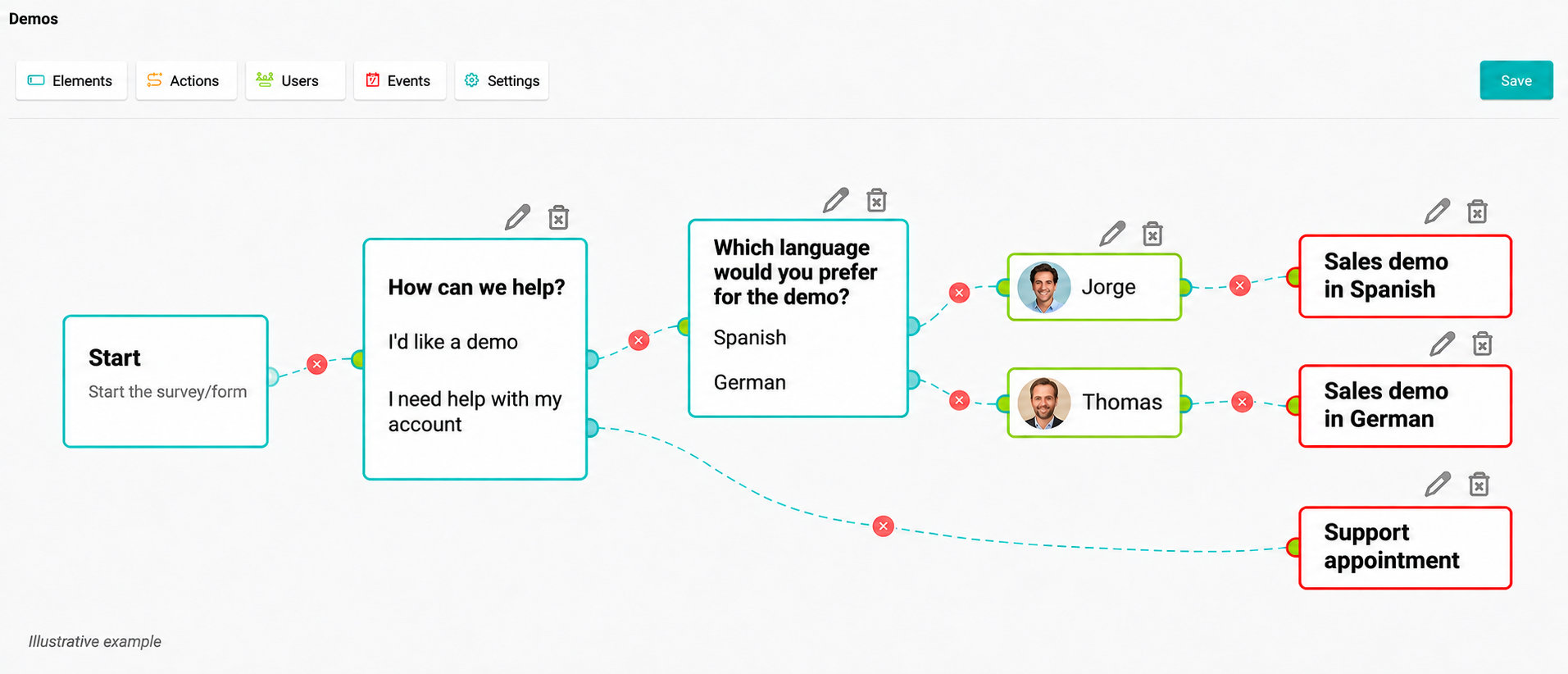
Direct assignment example: Jorge handles demos in Spanish, Thomas handles demos in German, and account queries go to a support appointment.
The language of the form and the preferred language of the demo serve different purposes. Someone might fill in the form in Spanish and request a German-language demo for their team. Use their answer to route the request. If you publish the form in both languages, check that equivalent answers lead to the same destination in both versions.
4. Use Round Robin to distribute demos within each group
In the previous illustration, the form assigns each demo directly to a named person based on the requested language. If several people can host the same demo, route the request to the relevant meeting type and use Round Robin to distribute bookings among the sales reps who can host it.
Enable Round Robin for each meeting type where you want several reps to share bookings. Add Spanish-speaking hosts to the Spanish demo and German-speaking hosts to the German demo.
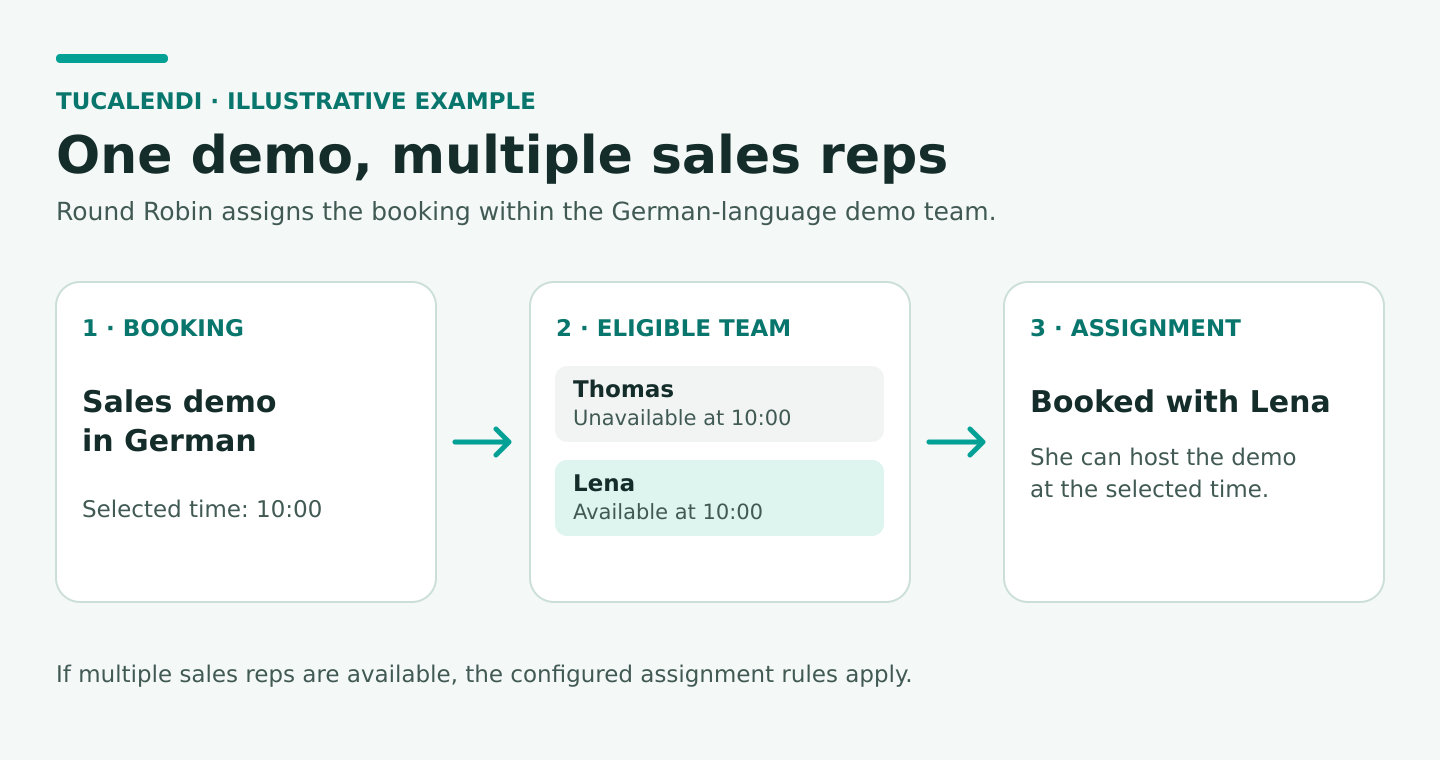
Availability affects the assignment, so bookings won’t necessarily go to the next person in a fixed order. If only one rep is available at the selected time, that rep can take the booking. If the German demo has no available times, check that team’s availability before changing who can host it.
For example, if Thomas is unavailable at 10:00 and Lena is available, the demo is booked with Lena. If several reps are available at the selected time, the configured assignment rules apply.
For more background, see how to use Round Robin to schedule meetings.
5. Make three test bookings before sharing the form
Open the form as a customer would and use fictional details to complete each booking. Then check the result in TuCalendi.
| Test request | Expected result | What to check |
|---|---|---|
| Ana requests a demo in Spanish | The form opens Sales demo in Spanish. | The time slots belong to that meeting type, and the booking is assigned to a rep who can host it. |
| Jonas requests a demo in German | The form opens Sales demo in German. | Even if Jonas fills in the form in Spanish, choosing “German” determines the destination. Check the assigned rep too. |
| Laura is already a customer and needs help with her account | The form opens Support appointment. | The form skips the demo language question, and the booking stays out of the sales calendars. |
If a test fails, check where the booking went off track:
- Wrong meeting type: review the form condition and its destination.
- Right meeting type, but missing time slots or the wrong host: check who is assigned to the event and their availability.
- Right meeting type and host, but confirmation in the wrong language: check the confirmation template.
These three tests validate the routes. To check Round Robin as well, make several test bookings within the same demo type, choose times when more than one rep is available and compare the assignments with your settings.
When is it worth automating demo assignment?
If one person handles every demo, a booking link may be enough. A routing form helps when an answer changes which appointment to offer. Round Robin helps when several people can host the same appointment type.
Start with one criterion you already use to route requests manually, such as language, product or booking purpose. Once your test bookings reach the right destinations, add more rules as needed.
Book a demo with the TuCalendi team. We can help you decide what to ask on your form, how to set up your meeting types and how to distribute demos within each team.